
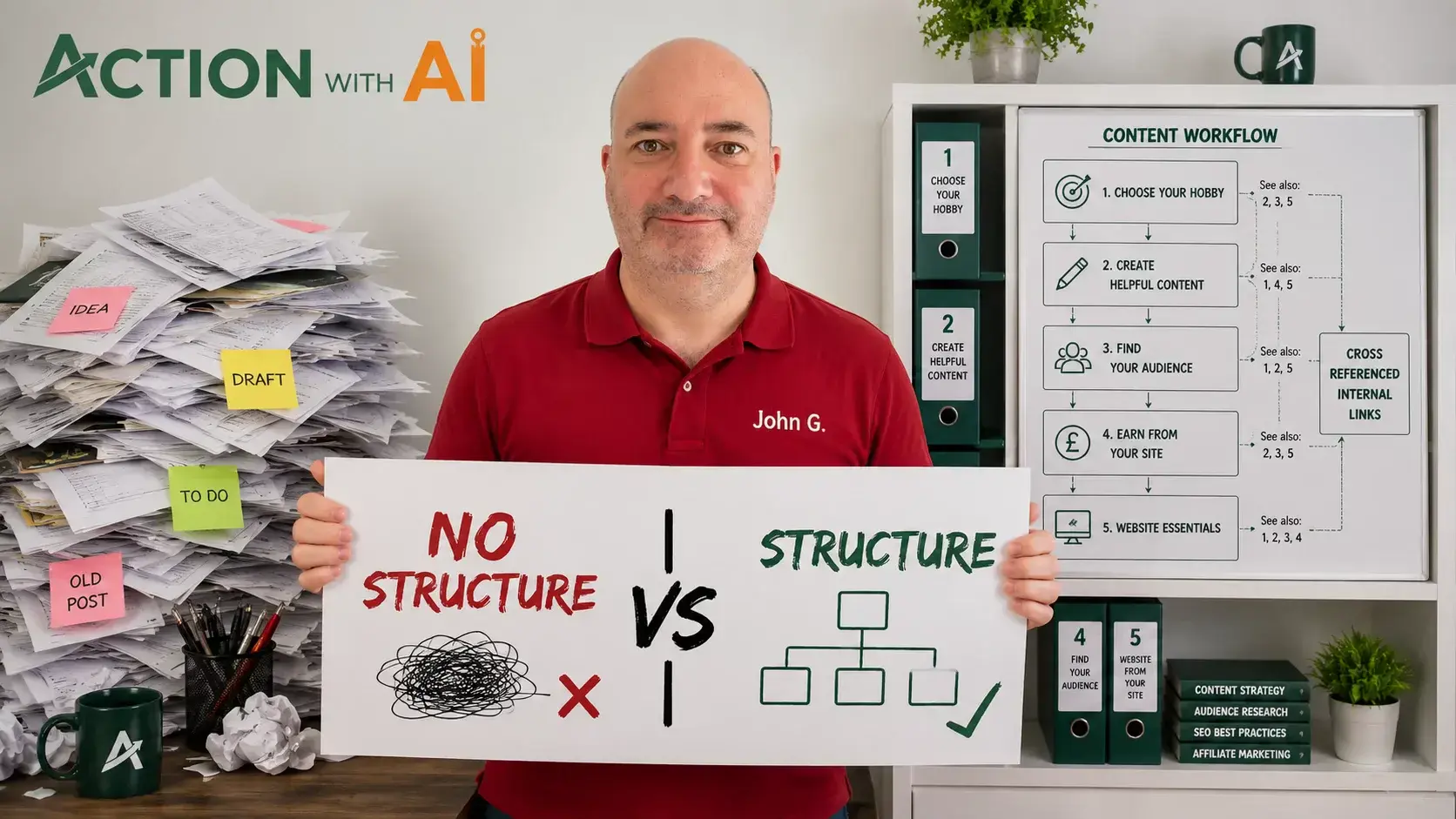
Imagine printing every post from your website and dropping the pages into a large box.
Every article might contain useful information. However, someone opening the box would have no idea where to begin, which pages belong together or what order they should read them in.
Now imagine organising those same printouts into labelled sections. Each section begins with a contents page explaining what it covers and listing the articles in a sensible order. Notes in the margins point towards other pages containing connected information.
The articles have not necessarily changed, but the collection has become much easier to understand and use.
That is the difference between publishing post after post and building a properly organised website.
On a website:
- The individual printouts are your posts.
- The labelled sections are your categories or topic groups.
- The contents pages are your hub pages.
- The suggested reading order is the reader’s journey.
- The margin notes are your internal links.
- The binder tabs are your menus.
You do not need to predict every article you will ever publish. You do, however, need enough of a plan to understand how your main subjects fit together and where each new post belongs.
Begin with the outcome and map the reader’s journey
Before planning menus, categories or article titles, ask:
What complete outcome is this website intended to help someone achieve?
Action With AI aims to help ordinary people use AI and their own experience to build useful hobby websites.
Once that outcome is clear, I can identify the major stages someone may need to pass through:
- Understand what building a hobby website involves.
- Choose a suitable hobby or subject.
- Build and organise the website.
- Create genuinely helpful content.
- Help the right audience discover it.
- Explore appropriate ways to earn from it.
These stages provide the foundations of the website structure. Each one can become a main hub containing more detailed supporting articles.
You can apply the same process to any hobby.
A beginner gardening website might take someone from choosing what to grow through preparing the soil, planting, ongoing care, dealing with common problems and harvesting.
A beginner telescope website might guide someone through understanding different telescope types, choosing suitable equipment, setting it up and finding their first objects in the night sky.
The precise stages will vary, but the principle remains the same: structure the site around the reader’s journey rather than the order in which ideas occur to you.
I originally wrote about what interested me
Action With AI did not begin with its present structure.
I was interested in AI generally, so I wrote about large language models and different AI tools. I then became particularly interested in experimenting with Google AI Mode.
I asked it questions, examined its answers, followed its citations and tested whether the sources supported the claims being made. Those experiments produced useful and original posts.
However, I was choosing subjects mainly because I found them interesting. I had not planned how every article contributed to a complete reader journey.
As the website developed, I realised that the AI Mode experiments represented only one part of what someone needed to know when building a hobby website.
The experiments still deserved their place. The problem was not that I had written them. The problem was that large parts of the wider journey had not been covered.
I exported the existing posts and pages from WordPress and used ChatGPT to analyse them. It identified the subjects already covered, grouped related articles, mapped the complete reader journey and highlighted the gaps.
That exercise gave me a structured production plan.
If I were starting again, I would create the overall map first. However, I do not regard the earlier work as wasted. I enjoyed conducting those experiments, and they helped establish some of the more distinctive ideas on the site.
Enjoyment matters. A content plan should provide direction without preventing you from exploring a worthwhile idea simply because it was not on the original list.
Turn each major stage into a hub
A hub page is the contents and orientation page for one major area of your website.
It should do more than display a list of article titles.
A useful hub can:
- Introduce the subject.
- Explain why it matters.
- Identify the main decisions involved.
- Show how the supporting posts fit together.
- Present them in a sensible order.
- Help the reader choose an appropriate next step.
For example, a Build Your Website hub could connect posts about:
- What you need to get started.
- All-in-one platforms and separate hosting.
- Choosing an appropriate hosting plan.
- Selecting a domain name.
- Installing WordPress.
- Checking the initial settings.
- Choosing a theme.
- Selecting essential plugins.
- Creating backups.
- Creating essential pages.
- Planning the website structure.
Each post answers a particular question in detail. The hub explains how those questions relate to the broader job of building the website.
The posts do not have to be displayed in publication order. The hub can arrange them in the order that makes most sense for someone learning the subject.
Give most posts one clear home
Most articles should have one primary hub.
A post can overlap with another part of the site without needing to appear everywhere. Use an internal link to make the secondary connection.
For example, website structure affects how people and search systems discover content, but this article still belongs primarily within Build Your Website. It can link to separate discovery articles where those issues are explored more fully.
Giving a post one clear home helps you define its purpose while still allowing it to connect with the wider site.
Categories group posts; hubs guide readers
WordPress categories allow related posts to be grouped together. Clicking a category normally opens an archive containing the posts assigned to it. WordPress describes categories as a way to organise related posts and help visitors find them.
Your main categories might correspond with areas such as:
- Choose Your Hobby
- Build Your Website
- Create Helpful Content
- Find Your Audience
- Earn From Your Site
Avoid creating a new category whenever one post does not fit perfectly into an existing group. A collection of categories containing only one or two articles does not create much useful organisation.
It is also important to distinguish a category from a hub page.
A category archive collects posts. It will commonly display them according to publication date.
A hub page explains the subject and guides the reader. It can arrange articles according to the order in which they are most helpful.
The category creates the collection. The hub explains how to use it.
A useful category description can improve the archive by clarifying what it covers, but a deliberately written hub can provide much more guidance.
Your main menu does not need to list everything
A menu should expose the website’s most important destinations, not every page and post you have created.
For a journey-based website, the main navigation might contain:
- Start Here
- Choose Your Hobby
- Build Your Website
- Create Helpful Content
- Find Your Audience
- Earn From Your Site
Detailed supporting posts can then be reached through:
- Hub pages
- Category archives
- Internal links
- Website search
- Relevant post lists
WordPress menus can include pages, posts, categories and custom links. They can also contain submenus, but the navigation should remain simple enough for visitors to understand. WordPress menu guidance
Supporting and policy pages can sit in a footer menu:
- About
- Contact
- Privacy Policy
- Cookie Policy
- Affiliate Disclosure
That is how Action With AI is currently arranged. The main menu follows the hobby-website journey, while the footer provides access to the supporting pages.
Adding every post to the main menu would not create a better structure. It would produce a longer and more difficult menu.
Use internal links as margin notes
Internal links connect related pages on your website.
In the printed version, they would be the notes in the margins telling the reader:
- Read this explanation first.
- See this related example.
- Continue with the next stage.
- Return to the main contents page.
Several types of internal link are particularly helpful.
Hub to supporting post
The hub introduces a question and directs the reader to the detailed article.
Supporting post to hub
The post points back to the broader section so the reader can see where the subject fits and explore other steps.
Post to connected post
One article points towards prerequisite information, a deeper explanation or the logical next action.
Older post to newer post
When you publish something new, relevant older articles can be updated to link to it. This prevents the new post from becoming isolated.
The link wording should explain what is at the destination.
“Click here” provides very little information.
A sentence such as this is clearer:
Before installing WordPress, decide whether you prefer an all-in-one website platform or separate hosting.
The relevant descriptive words can link directly to that comparison.
Do not insert a link merely because two posts happen to use the same keyword. The destination should help the reader at that point in the article.
A blogroll and sitemap do not replace structure
Action With AI currently uses a blogroll as its homepage.
A blogroll displays posts in publication order. It can show that the site contains a growing body of work and provide access to recent articles.
However, publication order is not necessarily a sensible reading order.
An article about WordPress backups may appear beside an AI Mode experiment simply because they were published on consecutive days. That does not mean they belong in the same learning sequence.
An XML sitemap can help search engines discover URLs, particularly on a new website. Google describes submitting a sitemap as one way of helping it discover multiple pages. However, a sitemap does not explain the relationships between the articles to a human reader.
A blogroll, XML sitemap, category archive and hub page each perform different jobs. None removes the need for clear navigation and relevant internal links.
Work through one hub at a time—but allow the plan to develop
Once the overall plan exists, I prefer to work through one hub area at a time.
I am currently completing the supporting posts for Build Your Website. When they are ready, I can create or rewrite the hub page so that it accurately reflects and connects the finished section.
This approach has several advantages:
- The section becomes useful more quickly.
- Related research can be reused.
- Internal-link opportunities are easier to identify.
- Missing steps become more visible.
- Readers encounter fewer unfinished routes.
- The website develops clear groups of connected information.
Continually moving between unrelated hubs can leave every area partially developed.
The plan should not become so rigid that you ignore a valuable new idea. Research, experiments, reader questions and search data will reveal topics that were not obvious at the beginning.
The plan provides a default direction. It is not an unchangeable contract.
While the website remains incomplete, a short message on the homepage or Start Here page can explain that further sections are being published. There is no need to hide finished and useful content behind a site-wide “under construction” screen.
Draw the structure before building it
You do not need specialist mapping software.
A sheet of paper, document or spreadsheet is enough.
Begin by writing the overall outcome:
Help a particular type of reader achieve a defined result.
Then list the major stages and supporting questions:
Hub 1
- Supporting question
- Supporting question
- Supporting question
Hub 2
- Supporting question
- Supporting question
- Supporting question
For each proposed post, ask:
- Which hub does it primarily support?
- What might the reader need to understand first?
- What is the logical next step?
- Which other posts contain connected information?
- Does this question deserve its own article?
- Is it already covered elsewhere?
You are creating the basic contents pages and cross-references before filling the site with articles.
The structure will evolve, but each new post will begin with a clearer purpose and a logical place to belong.
How to repair a website you have already started
If you have already published dozens of disconnected articles, you do not necessarily need to start again.
Use the following process:
- List the existing content. Export the posts and pages from WordPress or record their titles, URLs, categories and subjects in a spreadsheet.
- Restate the website’s purpose. Write one sentence explaining who it helps and what it helps them accomplish.
- Map the complete reader journey. Identify the major stages required to reach that outcome, including areas not yet covered.
- Assign each useful post a primary home. Place it beneath the hub it supports most directly.
- Identify missing, duplicated and outdated content. These findings will help shape the production and revision plan.
- Create or improve the hub pages. Give each major section an introduction and a sensible route through its supporting articles.
- Add internal links. Connect hubs and posts, related articles, and relevant older and newer content.
- Simplify menus and categories. Remove unnecessary labels and keep the main navigation focused on important destinations.
- Preserve existing URLs wherever possible. Reorganising the site does not normally require changing the addresses of established posts.
AI can help classify a large collection of pages and suggest relationships, as it did for Action With AI. However, the website owner must still decide whether the proposed structure accurately represents the purpose of the site.
Check whether the intended structure is being understood
After publishing, compare the structure you intended with the way the website is being interpreted.
Useful evidence can include:
- Queries and impressions in Google Search Console.
- Google’s indexed version of a page through URL Inspection.
- How Google AI Mode describes the site or section.
- Your page titles, category descriptions and internal-link wording.
On Action With AI, a category originally called Google AI Mode Analysis appeared to be attracting searches from people looking for analysis software. I changed it to Google AI Mode Experiments, added a clearer description and redirected the old category address.
That was a targeted correction based on a genuine misunderstanding.
The full process of comparing Search Console, URL Inspection and AI Mode is covered in a separate article. The important point here is that your structure should be tested—but not continually changed in response to every isolated search impression.
Avoid unnecessary changes to established URLs
Planning the structure early reduces the need for disruptive changes later.
Continually renaming categories, rearranging menus and changing slugs creates additional maintenance and increases the risk of broken links or confusing navigation.
If a page needs improvement, you can normally rewrite it without changing its URL.
Changing an established address is more serious because it may already have been indexed, bookmarked or linked from elsewhere. If a URL genuinely needs to change, the previous address should redirect to the replacement.
Redirects are useful, but they should not become a substitute for thinking carefully about the structure.
Keep the organisation as simple and stable as you reasonably can. Then concentrate on creating and connecting useful content.
Organise the knowledge, not just the menu
Website structure is not merely a design exercise.
It shows readers how your knowledge fits together.
The posts provide the detailed information. Categories group related material. Hub pages explain each major section. Menus expose the principal routes. Internal links provide the cross-references.
Without those relationships, even excellent articles can feel like printouts dropped into a box.
Your structure does not need to be perfect before you publish. It needs to be thoughtful enough that readers can understand where they are, how the page relates to the wider subject and where they can go next.
That is what turns a growing collection of posts into a useful website.